


A field service schedule can look perfect on paper and still fall apart in practice.
An appointment is confirmed, but the required part is unavailable. A technician has the right skills but is assigned across town. A completed job needs another visit because something was missed.
Coordinating these moving parts has always been central to field service management. The difference now is how much businesses can automate, optimize, and manage in real time.
Salesforce Field Service Management, originally known as Field Service Lightning (FSL) and now called Salesforce Field Service and Operations, connects scheduling, dispatch, work orders, asset information, and mobile workforce management in one system.
This guide explores how the platform works, its key features, operational benefits, industry use cases, and pricing.
Salesforce Field Service and Operations (formerly Field Service Lightning / FSL) is an AI-powered, cloud-based Field Service Management (FSM) platform that connects back-office teams, field technicians, and customers in real time.
Built on the Salesforce platform, it manages work orders, technician scheduling, dispatching, asset maintenance, and on-site service activities.
Its capabilities support different users:
The platform also uses intelligent scheduling, route optimization, and workflow automation to reduce manual coordination, travel time, and scheduling conflicts.
Salesforce Field Service follows a workflow that connects customer service requests with the technicians responsible for completing them. Work orders define what needs to be done, while service appointments determine who will do it and when.
Here's how the process works:
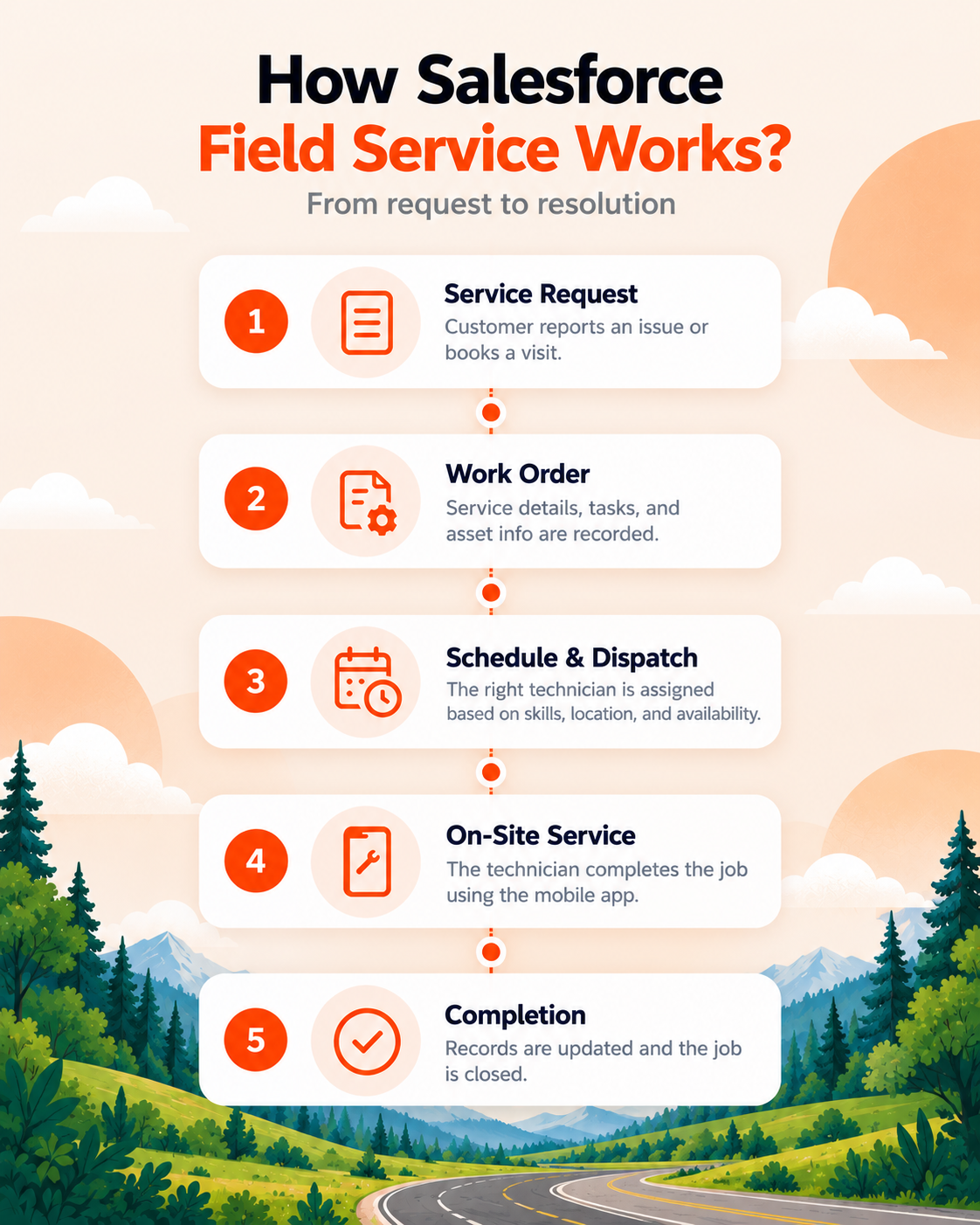
A customer reports an issue through a support channel, such as a call, email, or customer portal. The service team creates a work order in Salesforce, recording the service location, equipment involved, required tasks, and other relevant details.
Salesforce matches service appointments with available technicians based on their skills, location, working hours, and scheduling policies.
Dispatchers can review assignments through the dispatch console, adjust schedules, and accommodate urgent requests without manually rebuilding the entire day's plan.
Once dispatched, the technician receives the appointment through the Salesforce Field Service mobile app.
They can review customer information, equipment history, service instructions, and assigned tasks before reaching the location. Supported offline capabilities also allow technicians to work in areas with limited connectivity.
During the visit, technicians can update task statuses, record the parts used, capture photos, collect customer signatures, and document completed work directly in the mobile app.
These updates help dispatchers and service managers monitor progress without relying entirely on phone calls or manual reports.
After completing the work, the technician updates the service appointment and associated records. Service reports, equipment information, and job outcomes remain available in Salesforce for future visits, follow-ups, and performance reporting.
Customer notifications and subsequent activities, such as invoicing, can also be automated depending on the organization's configuration.
The workflow can accommodate additional visits, rescheduling, or follow-up work when a service request cannot be resolved in a single appointment.
Salesforce Field Service combines scheduling, dispatching, work order management, asset tracking, and AI-powered capabilities to manage field operations. Here are its key features.
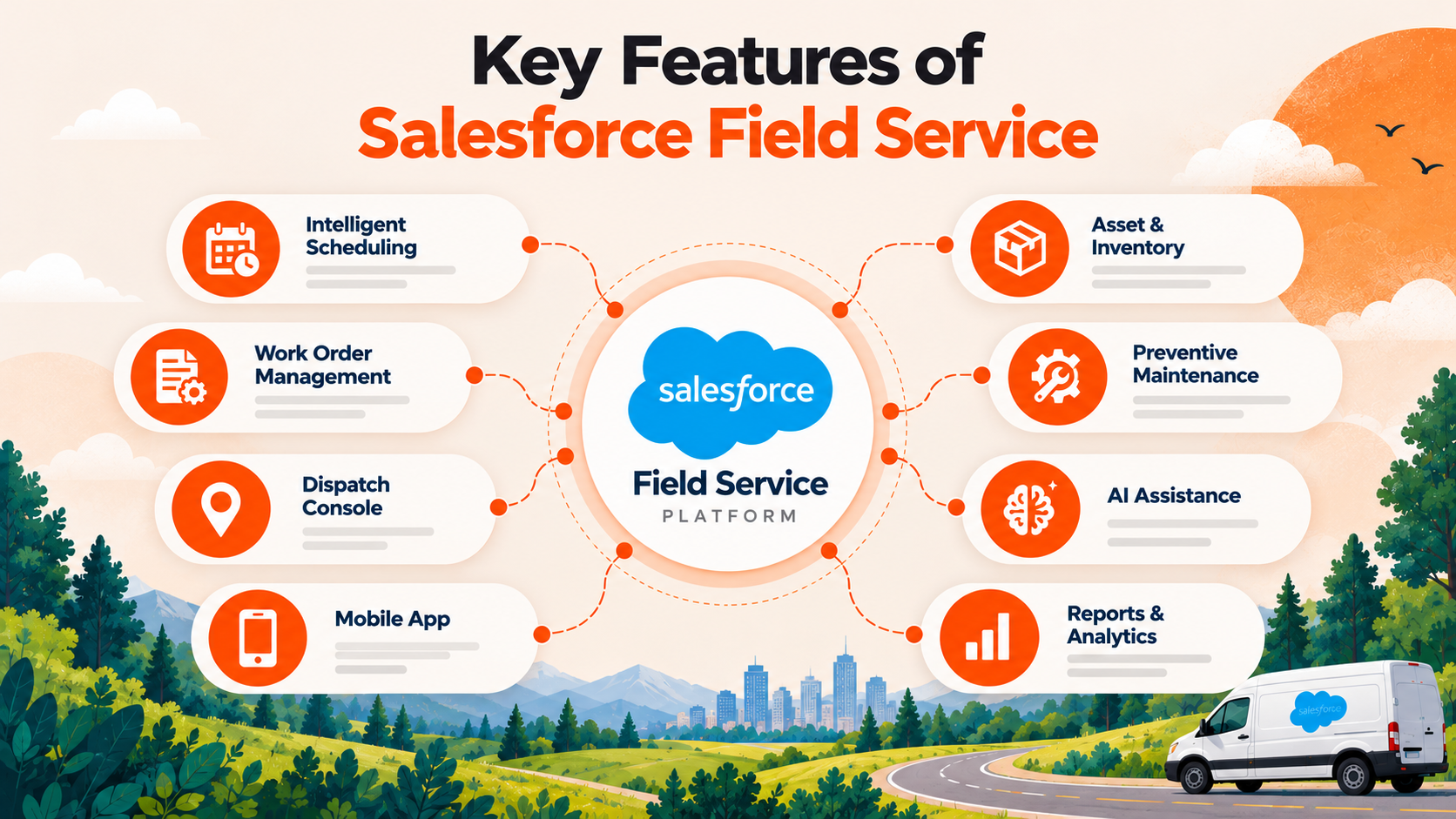
Salesforce assigns service appointments based on technician skills, availability, service territories, travel time, and scheduling priorities.
Dispatchers can manually override scheduling recommendations when needed.
Work orders contain service requirements, customer details, associated assets, and required tasks.
Salesforce enables teams to create and track work orders, divide complex jobs into smaller tasks, link multiple appointments to a work order, and standardize recurring jobs using work types.
The Salesforce Scheduling Console gives dispatchers visibility into service appointments, technician availability, and assignments.
Dispatchers can monitor schedules, reassign technicians, reschedule appointments, and manage urgent service requests from a centralized interface.
Salesforce introduced its newer Scheduling Console in Summer '26 to replace the Classic Dispatch Console.
The Salesforce Field Service mobile app for iOS and Android provides technicians with:
Supported offline functionality allows technicians to record information without an internet connection and sync it when connectivity returns.
Salesforce tracks customer assets, equipment service history, and inventory across warehouses, storage locations, and service vehicles.
Teams can monitor parts availability, record inventory transfers, track consumed products, and maintain equipment records to support repairs and maintenance.
Maintenance plans help businesses schedule recurring inspections and servicing based on defined time intervals or equipment usage.
Salesforce can automatically generate work orders from these plans, reducing manual scheduling and supporting preventive maintenance.
Agentforce capabilities support field technicians and service teams by retrieving relevant service information and reducing administrative work.
For example, Interactive Pre-Work Brief helps technicians review relevant CRM information and service history before an appointment.
Advanced AI capabilities may require additional licensing or usage-based credits.
Salesforce allows technicians to document completed work, record observations, and generate service reports.
Managers can use dashboards and reports to monitor:
These capabilities help teams maintain accurate service records and measure field operations against business targets.
A packed technician schedule doesn't necessarily mean a productive service operation. Travel time, repeat visits, scheduling conflicts, and incomplete job information can consume hours without adding billable work.
Salesforce Field Service helps businesses address these inefficiencies through the following benefits.
Technicians can review equipment history, customer records, service instructions, and required parts before visiting a site. Having this information available reduces avoidable return visits caused by missing details or equipment.
Intelligent scheduling and route optimization help assign nearby, qualified technicians and reduce unnecessary travel. Businesses can also limit overtime and fuel expenses by improving appointment allocation.
The Field Service mobile app reduces paperwork and manual reporting. Technicians can update work orders, record parts consumed, capture signatures, and complete service reports directly from the job site.
Dispatchers can identify available technicians, accommodate urgent jobs, and reschedule appointments when priorities change. This helps businesses respond to emergencies without manually reviewing every assignment.
Customers can receive appointment confirmations, arrival updates, and service notifications. Access to accurate customer and service records also helps technicians avoid asking for information already provided.
Equipment history and preventive maintenance plans help businesses schedule inspections, identify recurring issues, and manage maintenance activities before failures occur.
Service managers can monitor work order statuses, technician utilization, appointment completion, and service performance through Salesforce reports and dashboards.
Work types, scheduling policies, and standardized service processes help businesses maintain consistent procedures across technicians, service territories, and locations. This also supports SLA management and reduces variation in how recurring jobs are handled.
The business impact depends on how accurately service data, technician availability, scheduling policies, and operational processes are configured in Salesforce.
Different industries have different field service needs. Salesforce Field Service helps businesses schedule technicians, manage service requests, and track work across locations.
Here's how Salesforce Field Service helps across three industries.
For manufacturers, equipment downtime comes at a cost. A machine breakdown can delay production, disrupt delivery schedules, and leave maintenance teams scrambling for replacement parts.
Even routine maintenance gets complicated when equipment is spread across multiple facilities, technicians have different specializations, and service records aren't easily accessible.
Salesforce Field Service helps manufacturers:
With regular maintenance scheduled and equipment records available to technicians, manufacturers can spot recurring problems, prepare for repairs, and reduce avoidable downtime. Maintenance teams also spend less time chasing information across facilities.
When a power line goes down or a water pipeline needs urgent repairs, there's little room for scheduling delays.
Utility companies often have hundreds of technicians working across different service areas. Finding the nearest qualified crew, assigning urgent jobs, and keeping track of repairs becomes difficult when multiple incidents happen at once.
Salesforce Field Service helps utility providers:
This gives dispatchers a clearer picture of which crews are available, where they're assigned, and how repairs are progressing. During emergencies, they can redirect resources to urgent jobs while keeping track of the work already scheduled.
A customer books an AC repair. The technician arrives, inspects the unit, and discovers that a replacement part is needed. Now the customer needs another appointment, and the business has to arrange a second visit.
For HVAC, plumbing, and appliance repair companies, situations like these consume technician hours and create scheduling backlogs.
Salesforce Field Service helps home service businesses:
When technicians know what they're walking into and have access to the right parts and service history, they're better prepared to finish repairs during the first visit. That means fewer avoidable return trips, more room in the schedule for new appointments, and less waiting for customers.
Traditional field service management tools help businesses schedule appointments, assign technicians, and track service jobs. Salesforce Field Service handles these activities too, but connects them with customer records, asset history, and service operations within Salesforce CRM.
Here's how they compare:
Traditional FSM software can meet the needs of businesses primarily looking for appointment scheduling, dispatching, and job tracking. Many modern FSM platforms also offer advanced automation, AI, and CRM integrations.
Salesforce Field Service is particularly relevant for businesses already using Salesforce CRM or those that need their customer service, asset management, and field operations to share the same records.
The choice depends on existing systems, integration requirements, operational complexity, and licensing costs.
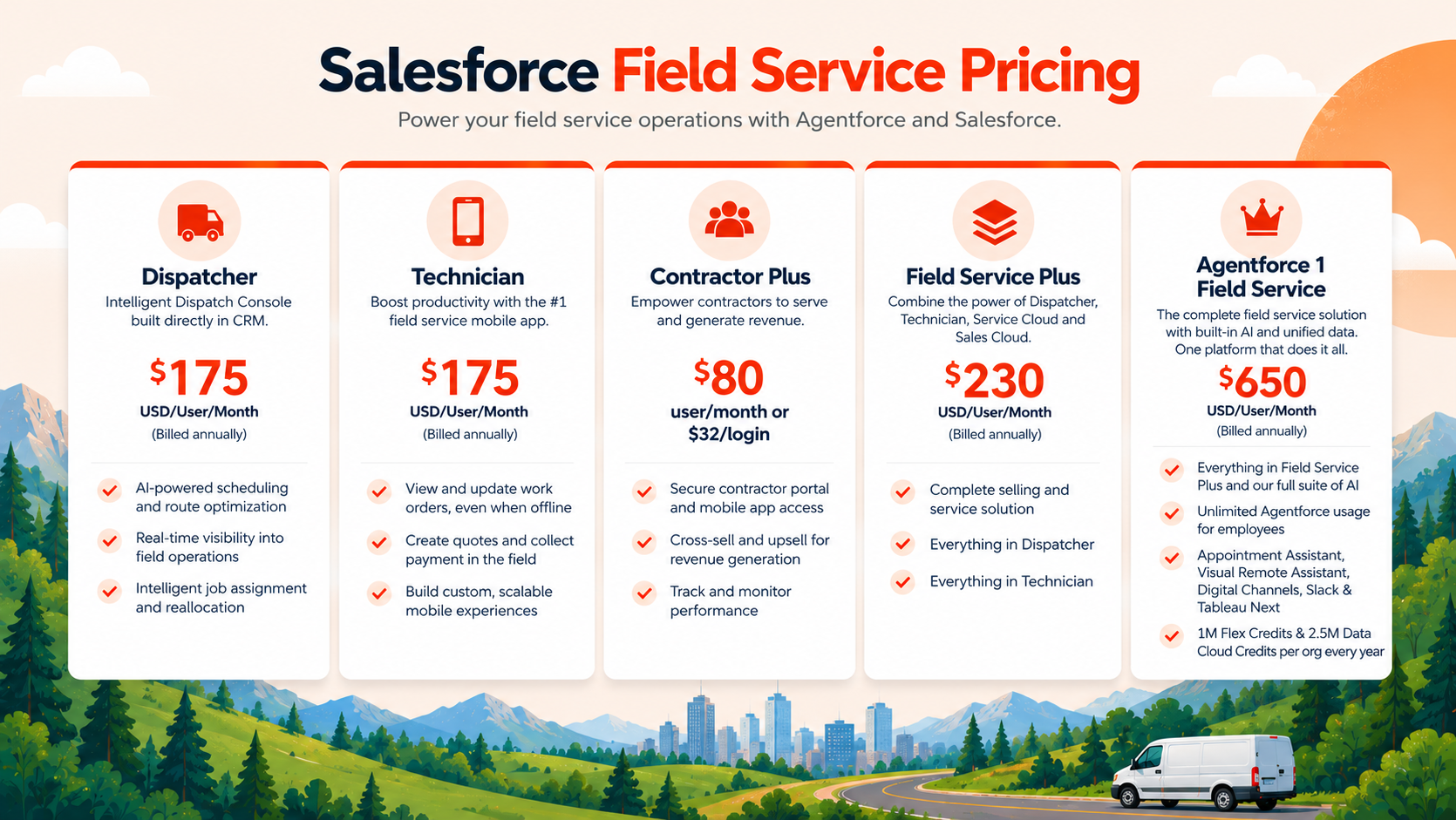
Salesforce Field Service pricing depends on who needs access to the platform and the features they use. Dispatchers, technicians, and contractors have different licensing options, while businesses that need CRM and advanced AI capabilities can choose bundled editions.
Subscription pricing is only one part of the total cost. Businesses should also consider:
The right plan depends on your team's needs:
Before choosing, check the licensing requirements, included features, and additional costs with Salesforce.
Salesforce Field Service helps businesses manage technicians, schedules, and service operations in one place. But the real value depends on how well the platform supports the way field teams actually work.
From scheduling policies and work order automation to asset management and CRM integrations, every configuration affects how efficiently jobs get done.
At MIDCAI, our Salesforce consulting and implementation services help businesses build Field Service solutions around their operational needs, with the right workflows, integrations, and automation in place.
Your field operations deserve more than a working Salesforce setup.
Connect with our Salesforce experts to make every service visit count.

5+ years of experience in content strategy, marketing, and technical communication. At MIDCAI, I focus on turning ideas around Salesforce, data, and AI into clear, actionable insights that help enterprises attract the right audience and drive real adoption.
Got questions? We’ve got answers. Explore common queries to understand how we work and what to expect.
Yes. Field Service Lightning (FSL) was the original name of Salesforce Field Service. The product has since evolved and is now known as Salesforce Field Service and Operations. It continues to support technician scheduling, work orders, dispatching, and on-site service management.
Salesforce Field Service works with Service Cloud but has separate licensing requirements. Service Cloud manages customer support cases and interactions, while Field Service handles technician assignments, service appointments, and on-site work.
Yes. Salesforce can assign technicians based on their skills, availability, service territories, travel time, and scheduling policies. Dispatchers can also adjust assignments manually when needed.
Yes. The Salesforce Field Service mobile app allows technicians to access downloaded work orders, update job details, and record service information without an internet connection. Supported changes synchronize when connectivity is restored.
Yes. Salesforce Field Service can integrate with ERP, inventory, billing, and other business systems using APIs, MuleSoft, and supported integrations. This helps businesses keep service records, inventory information, and related operational data synchronized.
Get in touch with us for any enquiries and questions
Define your goals and identify areas where technology can add value to your business
We are looking for passionate people to join us on our mission.
where your skills fuel innovation and your growth powers ours


.jpg)