
.jpg)


Marketing Cloud Next Winter '27 is a long release, and the agent features take most of the attention. The smaller items matter as much to teams still on Marketing Cloud Engagement, because this release adds scripting outside email, link edits after a send, compliance archiving and flow version history. Below, the Winter '27 changes are grouped by the build decisions they affect, with Advanced Edition features and known limits marked.
Note: Winter '27 is still in pre-release. Features, editions and dates can change before general availability, so check the official release notes before you commit to a roadmap.
In Winter '27, Agentforce in Marketing Cloud Next moves beyond drafting and flow decisions. Two agents cover the work from planning to send. The Marketing Goals Agent decides which campaign, channel, content and send time each customer gets, and the Content Agent writes the assets those decisions call for. Marketers set how much the agent can do without approval and can review every decision it makes.
The agent picks the campaign, channel, content and timing for each person. It has three prerequisites that teams often find late in a project:
The Content Agent writes and edits copy and images for email, SMS, MMS and RCS in a shared workspace. It works from your marketing brief, customer data and brand guidelines. You can refine drafts in conversation, edit layout and text by hand, or change the code directly. Approved content publishes to Salesforce CMS for use in standard campaigns and Goals Agent campaigns.
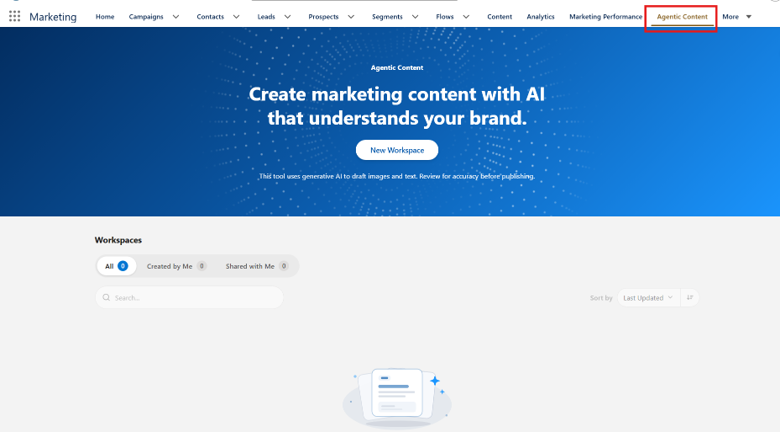
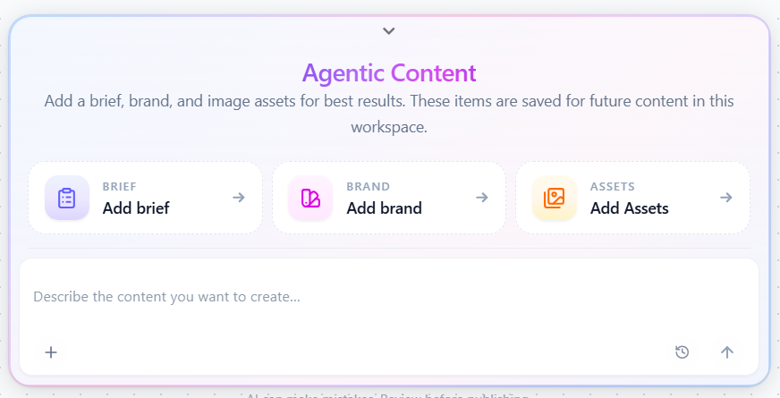
Both agents write from the same source. Brand Center stores identity, voice, tone and visual style as one brand kit. Once it is activated, agents and human authors both work from it, and content syndication shares it across workspaces.
Our take: finish the brand kit before you switch on either agent. With an empty or half-built kit, the agents produce generic copy, and marketing teams tend to judge the feature on those first drafts.
AMPscript and Handlebars reached Marketing Cloud Next email in Summer '26. Winter '27 extends them to SMS, WhatsApp, RCS, in-app messages, push notifications and landing pages. With the new Data Sources tab, a personalization setup built in Content Builder can be reused in other channels, and each token resolves to the same value for a given recipient wherever it appears.
In practice, four things change:
Our take: for teams moving off Marketing Cloud Engagement, this change has the biggest effect on migration cost. Existing AMPscript now carries over to more channels, so less of it has to be rebuilt, and rebuild work is usually the largest item in a migration estimate.
Our Marketing Cloud implementation blueprint explains how we scope that rebuild work.
Personalization controls what a message says. Flow Builder controls who gets it and when, and Winter '27 adds two things marketing operations teams have asked for there: a model that chooses the path, and a view of what changed between flow versions.
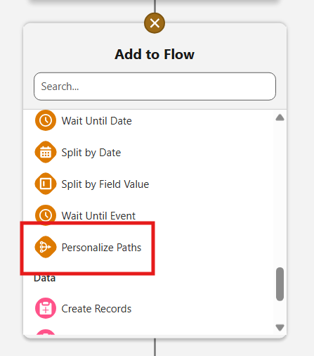
Add the Personalize Paths element, pick a success metric (a standard Salesforce metric or a custom engagement signal), and define the paths to compare, such as different channels or content variants. Each person goes down the path predicted to convert best, and the model keeps learning from real outcomes. Any extra engagement signals it should consider must be set up in advance.
Flows also reach further into CRM in this release. Two changes remove workarounds between Salesforce records and Marketing Cloud Next.
The Consent Request action now runs in record-triggered flows, so opt-ins and opt-outs can follow CRM changes. A new Lead can be subscribed to a newsletter when it is created, for example, or a Contact opted out of a stream when an Opportunity closes.
List sends without a Data 360 segment: Promotional, transactional and relational email can go straight to a filtered Contact or Lead list through Actionable Lists. Segment processing could delay these sends and occasionally make them fail, so sales-led teams gain the most here. Lists can also be imported from a campaign record and cloned with their members.
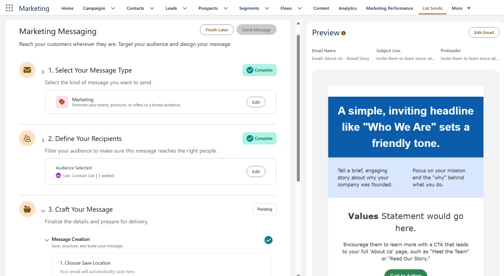
Each channel can have its own published preference page, with its own subscriptions, branding and button text, attached at message level. You can also reorder subscriptions and edit the header, body and button text. Grouping and nested layouts are still missing, so a long subscription catalogue shows as one flat list.
These features get less attention than the agents. For regulated organisations, though, several of them answer objections that held back a move to Marketing Cloud Next.
A score from 0 to 100, with alerts when key metrics reach warning or critical ranges. A Recommendation Details panel lists the root cause, affected campaigns and fixes ordered by impact.
A tracked link's destination can be changed after sending, through a Salesforce Support request. Links with merge fields all redirect to a single static URL.
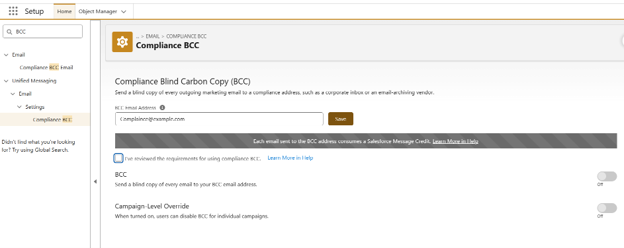
One org-level BCC address copies every sent email, set up under Unified Messaging in Setup, with an optional per-send override.
Route outbound mail through organisation-managed servers, with bounces, replies and complaints still handled.
Copies of sent email go to your own cloud storage via Data 360, bypassing the 100,000-emails-per-day limit of the Summer '26 archiving feature. At the time of writing, only Microsoft Azure is supported; Amazon S3 was dropped from the plan.
A secure, per-recipient link to a hosted version of the email on your branded domain.
Language variants managed inside one email in Content Builder, with Content Agent translation and edits in Component, Code or Text view.
A pool of candidate images, with the image chosen per recipient at send time from profile and engagement history.
Click metrics for a specific sentence, button or button-text variant across email, SMS, RCS, WhatsApp and mobile app messages.
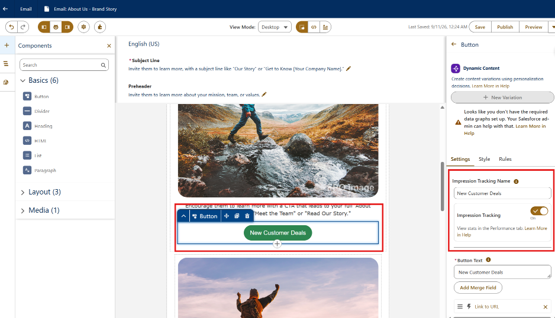
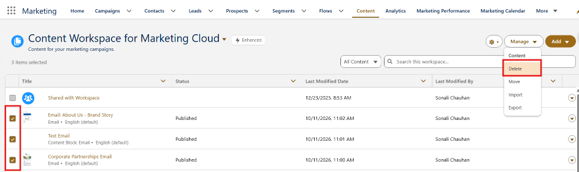
Two smaller fixes arrive too: plain-text preview (you still can't send a plain-text test) and bulk deletion of content and folders, including published content.
Until now, every programmatic send needed an on-demand flow. Two APIs remove that step.
Teams integrating order or account systems can pair these with the order-event REST trigger in the flows table above.
Retail: Unique coupon codes per recipient via a Coupons tab and CSV upload; prebuilt triggers and flow templates for birthday, anniversary, visitor conversion, re-engagement and replenishment; a trigger for new products in a customer's high-engagement category; and finer targeting through custom inactivity rules, excluding recent purchasers from stock and price alerts, minimum product-page visits, and Contact Point DMO mapping for channel selection.
B2B and analytics: B2B Analytics for Marketers brings accounts, opportunities, campaigns, engagement and attribution into Tableau Next dashboards, configured from Marketing Cloud Assistant Home (available from 10 August 2026). SMS analytics move into Flow Builder, SMS clicks are split into human and bot activity (and flows can continue only on human clicks), and the Content Performance dashboard adds a Mobile Push tab with an iOS/Android filter. A new campaign overview shows KPIs and content status from the campaign record.
Most of the release is opt-in. The items below need a decision or a task from your admin team:

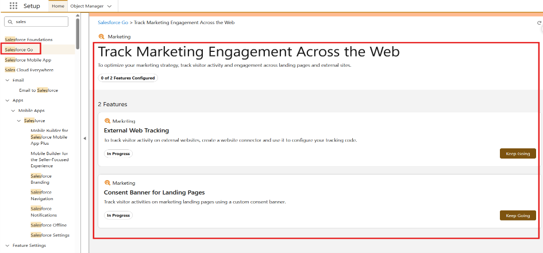
Fields and single records can also now be added to Marketing Objects directly from Data Explorer, including objects that already hold data.
If your business case for Marketing Cloud Next depends on any row marked "No" under Growth, settle the edition question before scoping.
For orgs still on Marketing Cloud Engagement, Winter '27 fills several feature gaps: script portability, post-send link edits, Compliance BCC, flow version comparison and API sends without flows.
The migration discussion can now focus on data model and process design. For orgs already on Marketing Cloud Next, start with the inputs the new agent and ML features depend on: a finished brand kit, consent logic in CRM and defined engagement signals.
New to the platform? Start with our complete guide to Marketing Cloud Next, or see how it compares in Marketing Cloud vs other automation tools.
If you're deciding which Winter '27 features belong in your next quarter, or whether to move off Marketing Cloud Engagement, our Marketing Cloud Next consultants can map the release against your current org in a working session.

As a Salesforce Consultant, I build AI-driven solutions and automation experiences that make technology feel simpler, smarter, and more human. Passionate about continuous learning, I enjoy turning complex ideas into systems that create real impact for users and businesses.
Got questions? We’ve got answers. Explore common queries to understand how we work and what to expect.
Winter '27 is in pre-release as of October 2026. Some items have their own dates: B2B Analytics for Marketers from 10 August 2026, and the landing page infrastructure update in October 2026. Check your instance's maintenance schedule on Salesforce Trust for the exact upgrade date.
Yes. The Content Agent is available in both Growth and Advanced. The Marketing Goals Agent, which decides campaign, channel, content and timing per customer, is Advanced Edition only.
Yes. Winter '27 extends AMPscript and Handlebars from email to SMS, WhatsApp, RCS, in-app, push and landing pages, and adds functions such as row claiming, regular expressions and hashing. Test each script in the new preview with real recipient data before reuse.
Yes, through Salesforce Support. A Support representative updates the tracked link's destination, and clicks redirect to the new URL a few minutes later. Links with merge fields redirect to a single static URL.
Get in touch with us for any enquiries and questions
Define your goals and identify areas where technology can add value to your business
We are looking for passionate people to join us on our mission.
where your skills fuel innovation and your growth powers ours


.jpg)