

Customer service has a funny little staffing plan: more cases, same people. Good luck.’
Salesforce says 65% of Service leaders expect case volumes to increase, while only 58% expect headcount to grow.
So the question is no longer just how to manage more cases. It is how to stop every case from needing the same amount of human effort.
That is the shift that Salesforce brought through Agentforce Service, formerly Salesforce Service Cloud.
This blog features Agentforce Service capabilities, benefits, and pricing breakdown where it fits into your customer service setup.
Agentforce Service is Salesforce’s customer service platform, formerly known as Salesforce Service Cloud.
At a basic level, it gives service teams one place to manage customer issues, conversations, case history, knowledge, routing, automation, and service performance.
So when a customer reaches out, the flow can look something like this:
That is why Agentforce Service is more than a ticketing system. It connects the customer conversation with the data and workflows needed to resolve it.
It also brings together capabilities such as case management, Omni-Channel routing, Knowledge, self-service, digital engagement, service automation, analytics, incident management, and AI-assisted service.
Here is what got upgraded actually:
In short, Service Cloud provides the foundation. Agentforce Service builds on it by making AI a more active part of everyday service work.
The same rename happened on the sales side. If you want the pattern rather than the product detail, Agentforce Sales, formerly Sales Cloud, followed an identical path.
One practical note: the Service Cloud name still appears across Salesforce documentation, release notes, and the pricing page itself. Both names point at the same product.
Customer support looks simple from the outside: a customer asks for help, someone answers.
Inside the service team, there is a lot more going on. A case needs an owner. The right Knowledge article has to surface. Another team may need to step in. And someone still has to keep an eye on the queue.
Agentforce Service brings that work into the same service environment. Here’s what each part actually does.
Every customer issue needs somewhere to live. In Agentforce Service, that place is usually a case. It keeps the issue, customer, owner, activity, priority, and resolution history together so the next person opening it does not have to reconstruct the story from scratch.
Getting work into Salesforce is easy. Getting it to the right person is where things get interesting. Omni-Channel helps distribute incoming service work using the routing rules your team sets.
The goal is fairly simple: fewer cases bouncing around before they reach someone who can actually resolve them.
Customers are not going to choose a support channel because it makes your CRM cleaner. Some email, some open chat, some go for a quick WhatsApp message and some still want to call.
Agentforce Service supports service conversations across these different touchpoints while keeping them connected to the wider Salesforce service environment.
Channel availability depends on the Salesforce edition and additional products in use, so not every channel comes bundled with every Agentforce Service licence.
Most service teams do not have an answer problem. They have a “where did we put that answer?” problem. Salesforce Knowledge gives teams a central place for FAQs, policies, troubleshooting steps, product guidance, and internal support information. Agentforce Service builds on that with several ways to make Knowledge easier to use.
So the Knowledge base is not just somewhere teams document what they know. It becomes part of how that knowledge gets found and reused during actual service work.
Sometimes the best support interaction is the one that never needs a rep. A password reset, return policy, setup question, or “where can I find this?” request does not always need to join the queue. Self-Service gives customers ways to find answers and handle common requests through customer-facing support experiences.
This is where the difference between a deflection bot and an AI agent shows up, a distinction worth understanding before you design the escalation path. Our breakdown of Salesforce AI agents versus chatbots covers where each one breaks.
A lot of service work has nothing to do with talking to the customer. Cases need assigning, records need updating, managers need notifications and sometimes follow-up work needs creating.
Doing all of that manually is a good way to turn a service rep into a professional button-clicker. Salesforce Flow and service automation handle many of those repeatable steps.
The useful automation is usually the boring stuff nobody should have to remember every single time.
“Please resolve this quickly” is not much of a service target. “First response within two hours” is.
Agentforce Service uses entitlements and milestones to turn customer support commitments into something teams can actually track.
Together, these features help the team see which commitments are comfortably on track and which are starting to become tomorrow’s escalation.
One customer saying “something is broken” is a case. A hundred customers saying it usually means the team has a different problem. Customer Service Incident Management helps connect service and operational work when an issue affects more than one customer or case.
That changes the service response from answering the same “is this down?” question repeatedly to manage the incident once and communicate it properly.
Eventually, almost every difficult case reaches the sentence:“We need someone from another team.”
That person may sit in Engineering, Finance, Operations, Product, or somewhere the service rep does not normally work. Slack for Service Cloud helps bring those specialists into the case without losing the Salesforce context.
So the answer may come from another team, but the service history does not disappear into another team’s Slack channel.
A dashboard full of closed cases can look great while customers are still waiting somewhere else. That is why service analytics needs to show more than what happened after the work was finished.
Because the useful question is not only “How many cases did we close?”
It is also “Where are customers getting stuck right now?”
The obvious benefits of Agentforce Service are easier case management, better routing, more automation, and faster access to customer information.
The more interesting value appears when those capabilities start working together.
Usually, a Knowledge base depends on someone documenting what the team already knows.
Agentforce Service starts bringing the learning closer to the actual service work. Self-Learning Knowledge uses case and chat interactions to identify useful information for Knowledge creation, while resolutions from service interactions can be reused the next time a similar question appears.
So the flow becomes:
Customer asks → team solves → knowledge is captured → the next resolution starts with more context.
Service is no longer only consuming knowledge. It is helping create it.
A surprising amount of a service rep’s day is not spent helping customers. It is spent routing cases, updating records, searching for information, sending standard responses, and keeping processes moving.
Agentforce Service brings automation, routing, Knowledge, self-service, and AI assistance into those parts of the workflow.
That gives routine process work somewhere else to go, leaving people with more room for conversations and decisions that actually need human attention.
Every service team has people who get pulled into difficult cases because “they’ll know what to do.”
Swarming in Slack makes that expertise easier to reach. Teams can bring subject-matter experts into a case or incident, give them the relevant Salesforce context, and keep the collaboration connected to the service record.
The bigger benefit is what happens afterwards. A useful resolution does not have to remain trapped in one expert’s head or disappear inside a Slack thread. It becomes context the wider team can reuse.
Traditional service reporting is very good at telling you what already happened.
Command Center for Service gives supervisors a view of what is happening now: open and active work, rep capacity, customer wait times, conversations that need help, and how work is distributed across the team.
That changes the job from reviewing yesterday’s backlog to spotting today’s problem while there is still time to do something about it.
When dozens of customers report the same issue, answering every case individually treats the symptom rather than the problem.
Customer Service Incident Management connects widespread disruptions with the cases, customers, teams, and work involved in resolving them. Teams can coordinate the response and broadcast updates to affected customers as the incident develops.
Instead of: 100 customers complain → 100 separate responses,
the service operation starts working around:
One issue is identified → response is coordinated → affected customers are kept informed.
Most customer service is reactive by design: something goes wrong, the customer notices, and then support gets involved.
Incident Management and Broadcast Communications give teams another option. Salesforce supports notifying affected customers about known issues and sharing updates while an incident is still active.
That moves service closer to “we know there is a problem, and here is what is happening” instead of waiting for another customer to ask.
A customer may move from self-service to a rep, from one queue to another, or from the service team to a specialist.
Agentforce Service keeps that work connected through Salesforce records, Knowledge, Omni-Channel, Service Console, incidents, and Slack-based collaboration.
The practical benefit is changing who handles the issue does not have to mean starting the story again.
The license price is the easy part of Salesforce pricing. Figuring out what you actually need is where the tabs start multiplying.
Here is the breakdown of latest Agentforce Service pricing as stated by Salesforce:
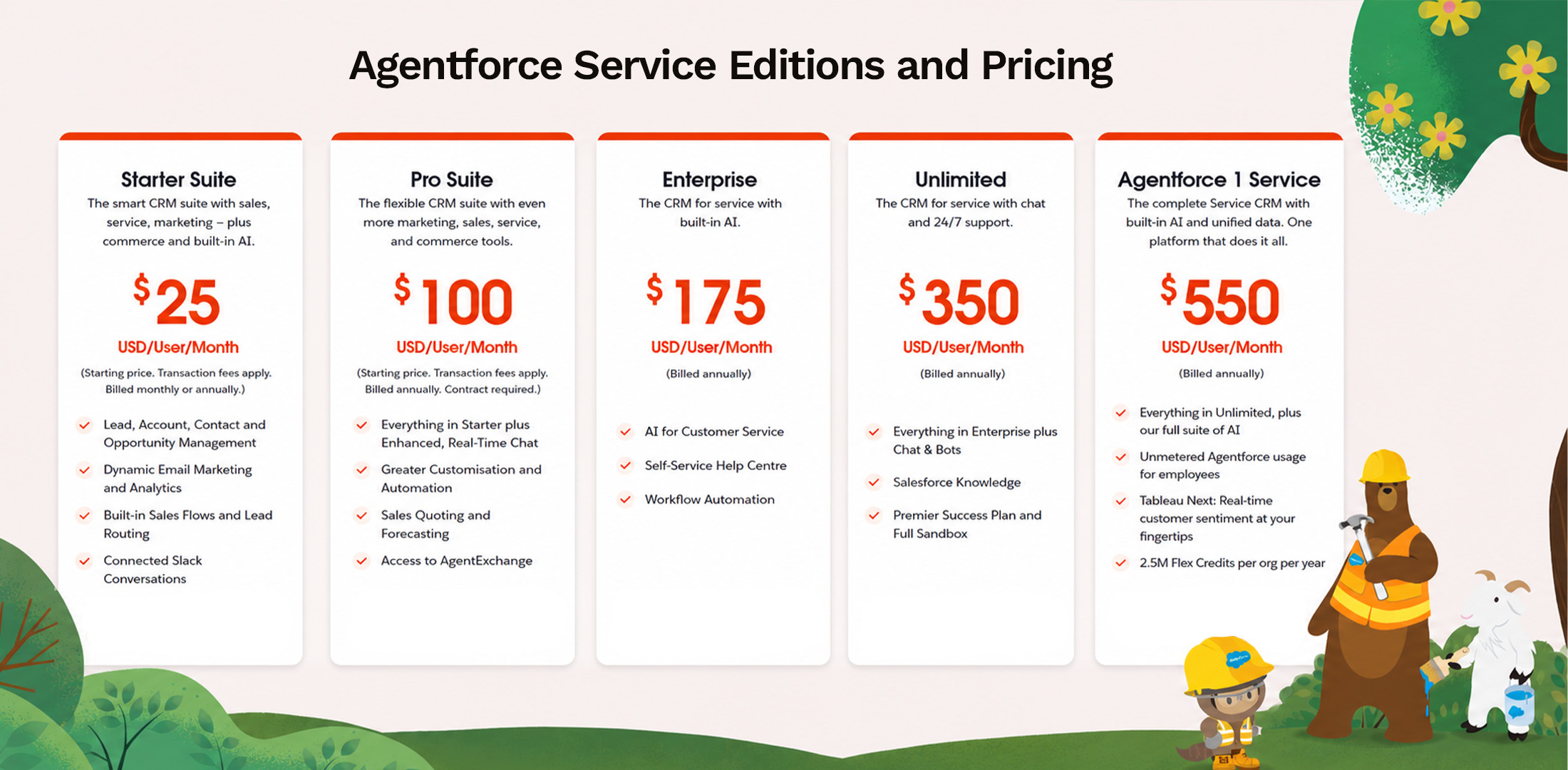
So, the higher price is not just for a renamed Service Cloud. You are paying for a broader service platform with more AI, automation, and data capabilities built around it.
This is the part worth checking before comparing editions only by their per-user price.
So, the useful question is not simply “Which Agentforce Service edition fits the budget?”
It is “Which edition already includes the service capabilities you need, and which ones will still sit outside the base licence?”
Agentforce Service can take a lot off your service team’s plate. The trick is making sure it takes off the right things.
The real value comes from how well it fits into the service operation you already have, not how many new capabilities you switch on.
That’s exactly what we do at MIDCAI. As an Agentforce implementation partner, we help businesses evolve from Service Cloud into a more connected setup, without turning the transition into a massive rebuild.
Turn Agentforce Service into more than another Salesforce upgrade.
Connect with experts today.

5+ years of experience in content strategy, marketing, and technical communication. At MIDCAI, I focus on turning ideas around Salesforce, data, and AI into clear, actionable insights that help enterprises attract the right audience and drive real adoption.
Got questions? We’ve got answers. Explore common queries to understand how we work and what to expect.
Agentforce Service is Salesforce’s customer service platform, formerly known as Service Cloud. It helps teams manage customer cases, knowledge, routing, service channels, automation, analytics, and AI-assisted support from the Salesforce platform.
Yes. Salesforce now refers to Service Cloud as Agentforce Service. You may still see the Service Cloud name across Salesforce products and documentation, but Salesforce identifies Agentforce Service as the current name for the platform.
Service Cloud provides the existing customer service foundation around cases, Knowledge, routing, automation, channels, and service operations. Agentforce Service builds on that foundation with deeper Agentforce and AI capabilities for customers, service reps, and service leaders.
Agentforce Service includes capabilities such as case management, Omni-Channel routing, Knowledge Management, service contracts and entitlements, workflow automation, self-service, digital service, analytics, incident management, and AI-supported service. Availability varies by edition and add-ons.
Salesforce currently lists five main Service editions: Starter Suite at $25, Pro Suite at $100, Enterprise at $175, Unlimited at $350, and Agentforce 1 Service at $550 per user/month, subject to the billing terms for each edition. Additional Agentforce, messaging, voice, and service capabilities can carry separate costs.
Get in touch with us for any enquiries and questions
Define your goals and identify areas where technology can add value to your business
We are looking for passionate people to join us on our mission.
where your skills fuel innovation and your growth powers ours
.jpg)