
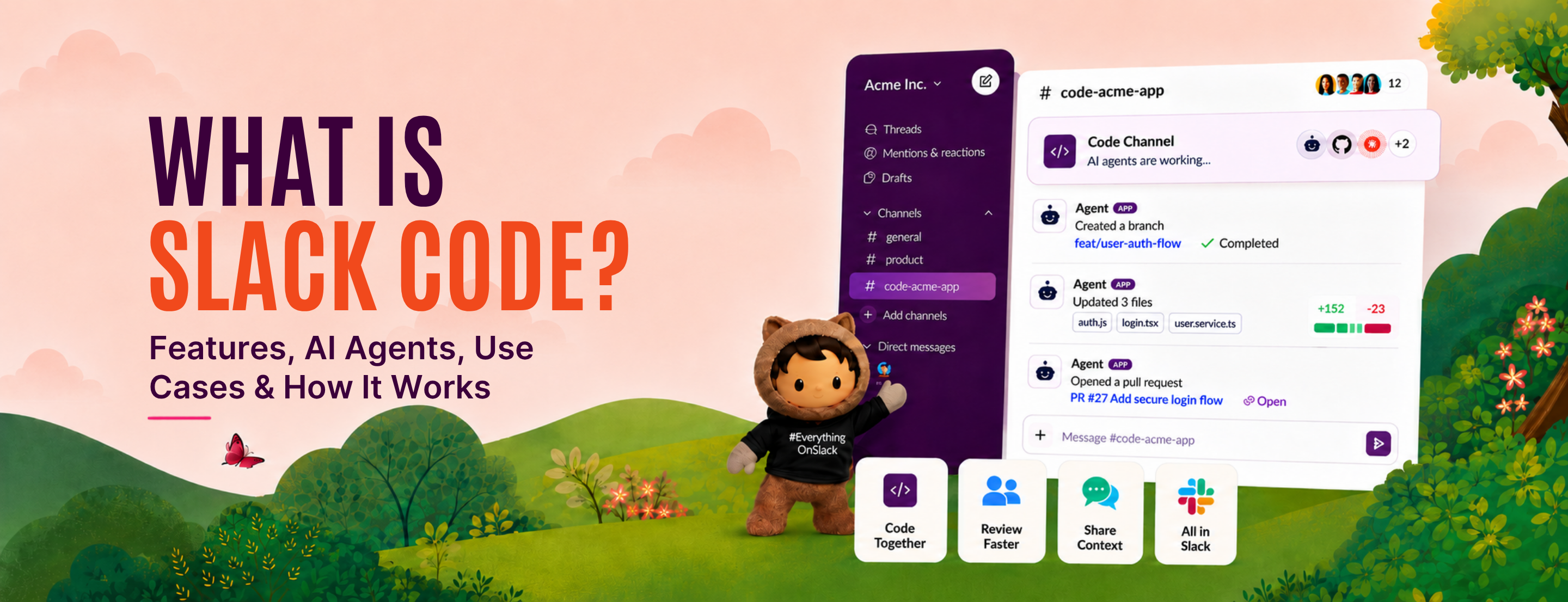


AI coding got faster. Keeping the whole team in the loop didn’t.
That is where Slack Code comes in.
It brings AI coding agents into dedicated Code Channels, giving teams a shared place to collaborate around development work instead of keeping it inside isolated AI sessions.
The idea is simple: make AI-assisted coding more collaborative, visible, and easier to work around as a team.
So, what exactly is Slack Code, and how does it work? Let’s break it down.
Slack Code is a way for teams to work with AI coding agents directly inside Slack. It uses Code Channels, which are dedicated spaces for bigger development tasks that need more than a regular Slack thread.
Instead of one developer working with an AI agent in a separate tool, Slack Code brings the work, the agent, and the team into one shared space.
That is why Slack calls it “multiplayer” software development.
A code channel is a new channel type in Slack built specifically for agent work. Each one maps to a single project or task. It carries dedicated tabs for the conversation, the plan, the code diffs, and a live preview. Code channels can be public or private, and only agents can create them.
The agent names the channel automatically based on the request that started it. Once you are a member, you can add other people or other agents to the same channel.
Slack ran into a structural problem with agent work: it did not fit anywhere well.
Regular Slack threads worked for quick requests, but bigger coding tasks quickly became messy. On the other hand, sending developers into separate browser tabs or terminals made the work invisible to everyone else.
Slack wanted something in between: a dedicated space where the agent could do deeper work without taking the team out of the process.
Code channels are the middle option. The agent gets room to run a long task, the team keeps visibility, and the record stays in the same place as the conversation that started it. Slack’s own framing is that when work is visible, knowledge compounds, so the next person picks up context instead of rebuilding it.
This follows the same direction as the 30+ AI features Salesforce added to Slack and the CRM work already running through Salesforce CRM in Slack: Slack becomes the surface where work runs, not just where it gets discussed.
Slack Code keeps long agent tasks out of crowded threads by giving each one its own channel. The flow runs in five steps.
Start in any channel or DM where a supported agent is present, mention it, and describe what you want built or fixed. You can also create a code channel manually from the Agents & tools tab on desktop, choosing the agent and whether the channel is public or private.
The agent spins up a code channel for the task and names it from your request. Depending on how the agent is configured, it can pull in just the person who tagged it, or infer who else belongs there based on the context it already has.
Everyone in the channel sees the same conversation the agent is working from, across dedicated tabs for the plan, the diffs, and the preview. Anyone can add context, flag a problem, or pause, redirect, and stop the agent if it drifts.
For high-stakes moves such as pushing to production, the agent packages its work for an expert to approve inside the channel. The review stays in the flow rather than moving to a separate approval queue.
When the task is done, the channel archives automatically and the record remains as an audit log. Slack also removes an inactive code channel from your sidebar after seven days, and you can close one yourself at any point. The history stays searchable.
The flow in short: task → code channel → agent builds → team reviews → human approves → channel archives.
A Code Channel gives the team more than a place to chat with an agent. It gives everyone a shared view of the work as it develops.
Agents can publish code diffs inside the channel, so teammates can see exactly what changed and review the work before it moves forward.
For interfaces, prototypes, or web changes, agents can share HTML previews that run inside Slack. This makes it easier to spot issues and give feedback without opening another tool.
Agent output can also appear as:
Anyone in the Code Channel can follow the work, add context, review previews, share feedback, or help guide the agent as the task develops. Slack also allows people to pause, redirect, or stop agent work when needed.
Code Channels can show whether an agent is still working, waiting for input, or has completed the task. Active sessions also appear in a dedicated section of Slack, making it easier to keep track of ongoing work.
The result is one place where the team can see the conversation, progress, code, previews, feedback, and related resources around the same task.
Slack Code is built to work with coding agents teams may already be using.
Slack currently lists these agent apps for Code Channels:
Salesforce also names ChatGPT alongside Anthropic, Cognition, GitHub, and Vercel as part of the Slack Code partner ecosystem. These partners are developing for Slack Code and using Code Channel APIs.
One thing to note: Slack’s current Code Channels FAQ specifically lists Claude, Devin, GitHub Copilot, and Vercel as available agent apps, so availability can differ by agent and rollout stage.
Slack Code becomes useful when a development task needs more than a quick message or a one-person AI session. Here are five practical examples of how teams can use Code Channels:
Suppose someone reports in Slack that users cannot submit a form after the latest update.
Instead of moving the conversation somewhere else, the team can start a Code Channel around that issue. The AI agent can work through the problem, prepare code changes, and share them for review.
Teammates can add more context or point out anything the agent missed before the fix moves forward.
Imagine a product team discussing a new dashboard filter in Slack.
That conversation can become the starting point for a Code Channel. The agent can work on the requested change while product, design, and engineering continue adding details or reviewing progress.
If the first version does not match the requirement, the team can give feedback in the same channel and ask the agent to revise it.
Say a feature suddenly stops working after a release.
A Code Channel can give the incident its own workspace instead of letting troubleshooting spread across several Slack threads. The team can add relevant details, while the agent works through the issue and prepares possible changes.
People can follow the investigation, add missing information, and review the proposed solution before acting on it.
Imagine an agent has finished a change and the team now needs to check the code.
Inside the Code Channel, teammates can review code diffs, comment on specific changes, flag an issue, and ask the agent to update its work.
For example, if a reviewer notices that one part of the change could affect another feature, they can point it out directly and have the agent revise the code before approval.
Suppose the team wants to update a landing page layout.
The agent can work on the change inside a Code Channel and generate a live HTML preview. Instead of asking non-developers to understand a code diff, the team can look at the actual page and give feedback on what they see.
A designer might ask for a spacing change, while the product team adjusts the copy or layout. The agent can then make those updates without starting a separate workflow.
Most AI coding tools assume one developer and one agent in a private session. Slack Code changes the surface, not the model doing the work.
Slack Code is not a replacement for the coding tools your engineers already use. It adds a collaboration layer around them, which is a different problem from generating better code.
Slack Code is available on all Slack plans, so there is no separate Slack Code edition to buy. However, access to the AI agent you want to use is separate. That means your team still needs the required account or subscription for the supported coding agent.
Slack does not list a separate price for Code Channels. Instead:
Slack Code is still an early product, so there are a few things to keep in mind:
Slack Code currently works with a defined set of coding agents rather than every AI coding tool available.
Having Slack Code does not automatically give your team access to the connected coding agent.
Slack says Code Channel APIs will open more broadly to developers, which means support for custom agents is still growing.
So while Slack Code is available broadly, the actual experience still depends on which agents your team can access and what integrations are currently supported.
Slack Code changes where AI coding happens. Instead of the agent working in a separate session, Code Channels give the task a shared place for context, feedback, review, and team involvement.
But bringing an AI agent into Slack is only one part of the setup. The real value depends on how well Slack connects with the way your teams, workflows, and existing tools already work.
At MIDCAI, our Slack implementation services help businesses build Slack around those real workflows, from integrations and automation to AI-powered ways of working.
Ready to make more of what your team already does in Slack?
Talk to our Slack experts.

5+ years of experience in content strategy, marketing, and technical communication. At MIDCAI, I focus on turning ideas around Salesforce, data, and AI into clear, actionable insights that help enterprises attract the right audience and drive real adoption.
Got questions? We’ve got answers. Explore common queries to understand how we work and what to expect.
Slack Code is a Slack feature that lets teams work with AI coding agents in dedicated code channels. You mention a supported agent in any conversation, it creates a channel for the task, and everyone in that channel can follow the work, review code diffs, check live previews, give feedback, and approve the result before it ships.
Salesforce named five founding partner agents at launch: Anthropic’s Claude, Cognition’s Devin, GitHub Copilot, ChatGPT, and Vercel’s agents. Slack’s Help Center currently lists four approved agents for creating code channels: Claude, Devin, GitHub Copilot, and Vercel. Availability differs by agent and rollout stage, so check both before planning a rollout.
Slack Code has no separate price and is available on every Slack plan, including free workspaces. The cost sits with the coding agent instead. Access to each partner agent is licensed separately by Anthropic, Cognition, GitHub, OpenAI, or Vercel. Salesforce notes that pricing, packaging, and regional availability are subject to change.
Agents in code channels inherit Slack’s existing permissions, security model, and admin controls, so IT does not provision new identities. For high-stakes actions such as pushing to production, the agent packages its work for a human to approve inside the channel, and the archived channel remains as an audit log.
No. Slack Code adds a collaboration layer rather than a new coding model. GitHub Copilot is one of the supported agents, not a competitor to it. Teams keep their existing coding tools and use code channels when a task needs the wider team to see the plan, review the diff, and sign off.
Get in touch with us for any enquiries and questions
Define your goals and identify areas where technology can add value to your business
We are looking for passionate people to join us on our mission.
where your skills fuel innovation and your growth powers ours

.jpg)