

IT support should not feel slower than the problem itself.
Yet many teams still manage password resets, access requests, device issues, and app errors through forms, queues, and manual follow-ups.
Salesforce Agentforce IT Service, often searched as Agentforce ITSM, brings AI agents, service desk workflows, request management, proactive incident handling, CMDB, Discovery, and Service Graph into one connected IT service model.
This blog explains what Agentforce ITSM means, how it works, and why it matters for modern IT operations.
Agentforce ITSM, officially called Agentforce IT Service, is Salesforce’s AI-driven IT service management solution for handling employee IT support, service requests, incidents, assets, and IT workflows from one connected platform.
It uses conversational AI agents to help employees request support through channels like Slack, Microsoft Teams, portals, email, and webchat. On the IT side, it supports service desk workflows such as incident management, request management, change management, knowledge management, CMDB, Discovery, and Service Graph.
In simple terms, Agentforce ITSM helps IT teams move from manual, ticket-heavy support to more connected, AI-assisted IT service delivery.
Agentforce IT Service gives employees an easier way to get help and gives IT teams better context to manage requests, incidents, assets, and changes. The following are the core capabilities of Agentforce ITSM:
AI Agents for Employees give people a simpler way to get IT support. Employees can report issues, ask questions, request software, request devices, or check updates through Slack, Microsoft Teams, portals, email, or webchat.
For employees, support feels more direct. They do not need to open a portal for every small issue or wait for a manual response when the request is simple enough for an AI agent to handle.
Service Request Management keeps common IT requests organized. It covers routine needs like password resets, software access, hardware requests, application access, and device support.
A service catalog guides employees to the right option. IT teams also get a clearer process to follow, so every request does not turn into a long chain of messages, approvals, and manual follow-ups.
Proactive Incident Management helps IT teams catch bigger issues earlier. If several employees report the same VPN issue, system error, or application problem, Agentforce can connect those reports and point to a possible wider incident.
The team gets a clearer picture before the issue grows. They can see what is happening, who is affected, and which problem needs attention first.
Multi-Channel Employee Engagement lets employees ask for help through the tools they already use. Support can happen through Slack, Microsoft Teams, webchat, email, portal cases, voice, SMS, WhatsApp, and other messaging channels.
Support becomes easier when employees do not have to search for the right place to raise an issue. They can start the conversation from their daily work tools, while IT still manages everything through a proper service process.
The IT Service Desk gives IT teams one place to manage service work. Teams can track incidents, problems, changes, requests, knowledge, and other IT workflows from a central workspace.
IT issues often connect to more than one thing. A device problem may link to an asset record. An app issue may link to a known incident. A system update may need approvals. The service desk keeps that work visible.
Agentforce IT Service supports ITIL-aligned processes such as Incident, Problem, Change, Request, Knowledge, and Release Management. These processes give IT teams a clear way to manage service work.
Agent Assist adds support inside those workflows. It can suggest next steps, show useful knowledge articles, create summaries, and support routine actions, so IT teams do not have to handle every small task manually.
The IT Domain Pack includes specialized AI agents for common IT needs like password resets and software provisioning. These are simple tasks, but they still take up a lot of IT time when handled manually.
Connectors allow Agentforce to work with other systems in the IT environment. That matters because IT support often depends on identity tools, HR systems, collaboration apps, device platforms, and business applications.
AI Agents for IT Teams support the people resolving issues. They can review incident history, find patterns, summarize cases, recommend actions, and support problems or change workflows.
IT teams stay in control of the final action. The agents reduce the time spent checking old cases, reading long updates, preparing summaries, or looking for repeated issues.
The Configuration Management Database stores information about configuration items, assets, dependencies, and relationships. It shows what systems, devices, services, and applications exist in the business.
Strong CMDB data gives IT teams better context during an issue. When something breaks, they can see which systems are connected, who may be affected, and which service needs attention.
Discovery finds assets and infrastructure details across the IT environment. It can identify systems, databases, instances, configuration items, and relationships, then use that information to support the CMDB.
Manual asset records become outdated quickly. Discovery keeps the asset picture closer to reality as systems change, which makes IT data more useful during support, incident, and change work.
Service Graph shows how applications, infrastructure, services, and configuration items connect. It helps IT teams understand dependencies instead of looking at every system separately.
During an outage or planned change, this view becomes useful. Teams can see what may be affected, which services are connected, and where they should focus first.
Together, these capabilities keep IT support connected from start to finish. Employees ask for help, AI agents assist, IT teams take action, and service data gives everyone the context they need.
Agentforce IT Service helps employees get IT support from the tools they already use, while giving IT teams better automation, visibility, and AI support to resolve issues faster. Following are the benefits of Agentforce ITSM:
Employees do not want to open a separate tool for every IT issue. Agentforce IT Service helps them ask for support through Slack, Microsoft Teams, portals, email, and webchat.
Password resets, software access, and hardware requests should not take hours. It helps automate these routine requests through a unified service catalog.
IT teams should not wait for several tickets to know something is wrong. Agentforce IT Service helps detect incidents, understand impact, alert employees, and start resolution workflows.
To fix an issue quickly, teams need to know what is affected and which systems are connected. CMDB, Discovery, and Service Graph help provide that context.
Employees need quick answers. IT teams need help with summaries, suggestions, routing, and resolution. It supports both through AI agents.
Modern IT support depends on people, tools, data, workflows, and service processes working together. Agentforce IT Service brings these parts into one connected IT service model.
This makes IT support easier to manage because the request, AI help, IT team action, and system context stay connected.
Slack-first ITSM means IT support starts inside the place where employees already work.
It does not treat Slack as just another notification channel. It turns Slack into a support entry point where employees can ask questions, report issues, request help, and receive updates without opening a separate portal.
Most employees do not want to leave their work just to raise an IT request.
With Agentforce IT Service, they can ask for support in Slack or Microsoft Teams and continue working while the request moves forward in the background. Salesforce’s guide also shows this shift from portal-based support to conversation-first IT service.
Password resets, access requests, and basic troubleshooting should not wait in long queues.
An employee can ask an AI agent for help in Slack, and the agent can guide the next step, check information, or move the request into the right workflow.
A Slack conversation can capture what the employee is facing in plain language.
Instead of receiving an incomplete form or scattered messages, IT teams get the issue, context, and conversation history in one flow. That makes handoff easier when human support is needed.
If many employees report the same issue through Slack, Agentforce can help identify a pattern.
For example, repeated VPN complaints may point to a larger incident. IT teams can act on the wider problem instead of treating every report as a separate ticket.
Some IT issues need more than one person to solve them.
Slack makes it easier for IT teams, experts, and business users to work around the same issue. The conversation stays closer to the problem, and teams can move faster without losing context.
Slack-first ITSM still needs clear rules.
Teams need to define who can approve requests, which issues need escalation, what data agents can access, and when a human must step in. Without this structure, Slack support can become noisy and hard to manage.
Slack-first ITSM works best when conversation, automation, service workflows, and governance stay connected. That is what turns Slack from a chat tool into a practical entry point for IT support.
Most IT issues look simple at first.
A password reset, access request, VPN error, or app issue may start with one employee, but the real cause often sits deeper: a device, system, application, service dependency, or recent change.
That is why Agentforce IT Service needs more than the employee’s request. It needs the right IT data behind it. With accurate asset details, service relationships, and system context, AI agents and IT teams can understand what is affected and where the issue may start, and what should happen next.
AI agents need the right IT data to support requests, incidents, and changes.
They need to know what assets exist, how systems connect, which services depend on each other, and who may be affected when something breaks. CMDB, Discovery, and Service Graph provide that context.
The CMDB stores configuration items, assets, dependencies, and relationships. It helps IT teams see which systems, devices, applications, and services exist across the business before they act on an issue.
Discovery identifies assets across the IT environment and adds configuration items and relationships to the CMDB. It reduces manual tracking and helps teams work with current asset data instead of outdated records.
Service Graph shows how infrastructure, applications, services, and configuration items depend on each other. During an outage or planned change, it helps teams see what may be affected and where to focus first.
When something breaks, IT teams need quick answers. CMDB and Service Graph help teams understand what failed, who is affected, which services depend on it, and what changed recently.
AI agents work better when they can access accurate data from connected systems. With the right context, they can understand requests more clearly, route incidents better, and support the next step with more confidence.
Together, CMDB, Discovery, and Service Graph give Agentforce IT Service the context needed to connect IT requests, incidents, assets, and system impact.
Agentforce IT Service fits best for teams that want IT support to be faster, easier, and more connected.
Companies already using Salesforce can fit Agentforce IT Service into their existing ecosystem. It can connect service workflows, AI agents, Slack, data, and automation in a familiar environment.
It works well where employees already use Slack or Microsoft Teams every day. Instead of sending people to a separate portal, IT support can start inside the same tools.
Teams handling repeated requests like password resets, access issues, software requests, and device support can use AI agents to reduce manual work.
It helps teams that struggle with disconnected assets, unclear dependencies, and poor system visibility. CMDB, Discovery, and Service Graph bring that context together.
Large teams need better ways to detect issues, understand impact, route work, and manage change risk. Agentforce IT Service supports these workflows in one connected model.
Slow IT support affects daily work. Agentforce IT Service fits companies that want employees to get help faster without switching between multiple tools.
Organizations do not need to change everything at once. They can start with simple use cases like access requests, employee support, or incident triage, then expand over time.
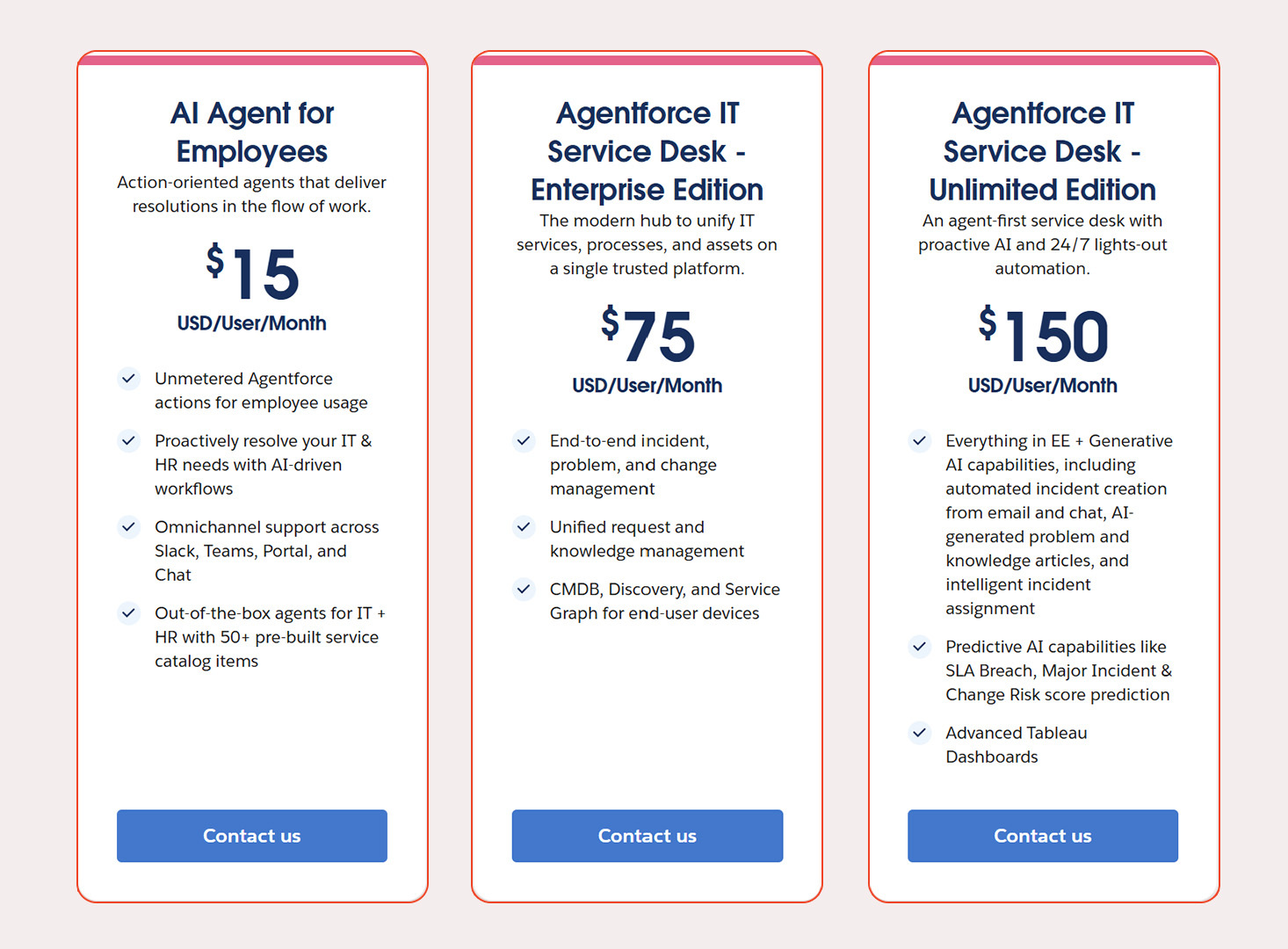
Agentforce IT Service pricing depends on what the organization needs: employee-facing AI agents, IT service desk users, advanced automation, or CMDB coverage.
Agentforce IT Service makes IT support feel closer to how people actually work.
Employees can ask for help from familiar tools. IT teams can manage service work with better data, clearer workflows, and AI assistance. Routine requests move faster, while complex issues still get the right human attention.
The key is knowing where to start.
At MIDCAI, our Agentforce consultants help businesses identify the right Agentforce ITSM use cases, prepare their IT data, connect existing systems, and design workflows that make sense for daily operations.
Ready to explore where Agentforce IT Service fits in your IT operations? Let’s map the right starting point together.

5+ years of experience across content, social media, and growth marketing. At MIDCAI, I focus on turning complex ideas around AI, data, and technology into clear insights and campaigns that help businesses attract and engage the right audience.
Got questions? We’ve got answers. Explore common queries to understand how we work and what to expect.
Salesforce Agentforce IT Service is an AI-driven IT service management (ITSM) solution that handles employee IT support, service requests, incidents, assets, and IT workflows from one connected platform. It uses conversational AI agents to resolve routine requests and gives IT teams service desk workflows backed by CMDB, Discovery, and Service Graph.
Yes. Agentforce IT Service is the official product name, while Agentforce ITSM is the term many people use when searching for it. Both refer to the same Salesforce solution for AI-assisted IT service management, covering employee support, incidents, service requests, change management, and IT asset data in one model.
Employees can request IT support through the tools they already work in, including Slack, Microsoft Teams, web portals, email, and webchat. Agentforce IT Service also supports voice, SMS, and WhatsApp, so people can raise an issue from daily work tools while IT still manages every request through one service process.
Together they give Agentforce IT Service the data context behind every request. The CMDB stores assets, configuration items, and their relationships. Discovery keeps that asset data current across the IT environment. Service Graph maps how systems and services depend on each other, so teams can see what an incident or change may affect.
Salesforce Agentforce IT Service is priced per user per month across three editions: AI Agent for Employees at $15, Agentforce IT Service Desk Enterprise Edition at $75, and Agentforce IT Service Desk Unlimited Edition at $150 (USD). Actual cost depends on the editions chosen and the number of users.
Get in touch with us for any enquiries and questions
Define your goals and identify areas where technology can add value to your business
We are looking for passionate people to join us on our mission.
where your skills fuel innovation and your growth powers ours